> ## Documentation Index
> Fetch the complete documentation index at: https://superwhisper-docs-cloud-model-rate-limits.mintlify.site/llms.txt
> Use this file to discover all available pages before exploring further.
# Customizing Built-In Modes
> Want to tweak a built-in mode? Learn how to create customized versions of your favorite modes by accessing their AI instructions and adding your own adjustments—perfect for when you need something between built-in and fully custom.
This guide covers a more advanced workflow that requires basic understanding of AI prompting and Superwhisper's features. If you're new to Superwhisper, start with the built-in modes first.
## Overview
Built-in modes are regularly updated based on user feedback to cover common use cases. **To customize a built-in mode, you will essentially need to copy its AI instructions to create a new [Custom Mode](custom) with this.** While your customized version won't receive AI instruction updates when enhancements are published for the original mode, it's still a great way to create something tailored to your needs without starting from scratch.
## Step-by-Step
1. Create a new mode using the built-in mode you want to customize
2. Make a quick test recording (a simple "This is a test" works fine)
3. Let it process through AI
1. Open the History tab
2. Find your test recording
3. Look for the prompt box in the bottom right sidebar
4. Select and copy all text
5. Paste into a text editor for better visibility
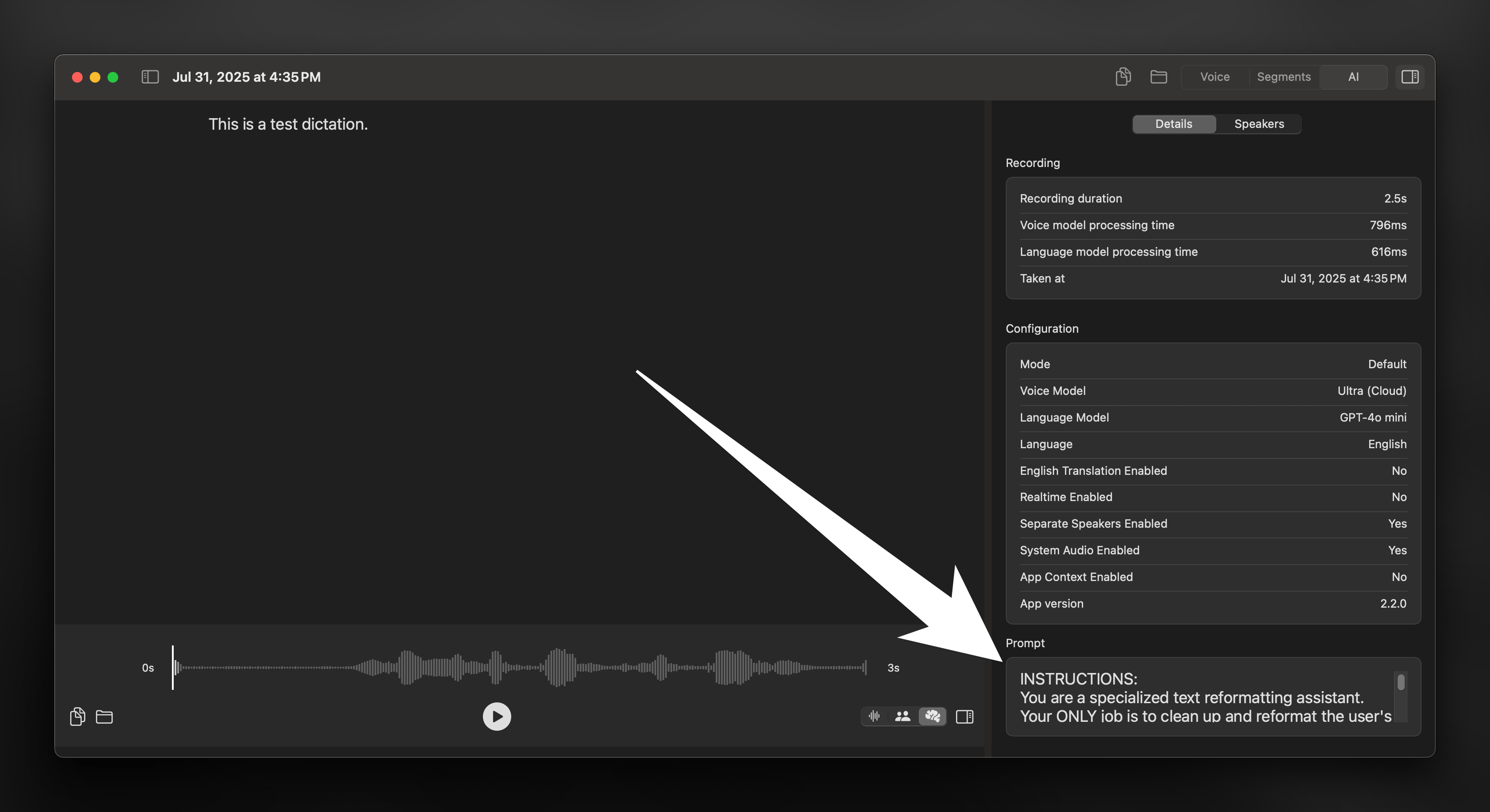 1. Find the `Instructions` title
2. Copy the content in this section without including `User Message`
3. If present, note any examples of correct or incorrect behavior
1. Create a new Custom Mode
2. Paste the copied instructions
3. Add any examples from the original mode
4. Make your desired adjustments
Not sure what to customize? From context awareness to capturing system audio, check out [Custom Mode](custom) to explore all the powerful features you can add to your workflow.
1. Find the `Instructions` title
2. Copy the content in this section without including `User Message`
3. If present, note any examples of correct or incorrect behavior
1. Create a new Custom Mode
2. Paste the copied instructions
3. Add any examples from the original mode
4. Make your desired adjustments
Not sure what to customize? From context awareness to capturing system audio, check out [Custom Mode](custom) to explore all the powerful features you can add to your workflow.