> ## Documentation Index
> Fetch the complete documentation index at: https://superwhisper-docs-cloud-model-rate-limits.mintlify.site/llms.txt
> Use this file to discover all available pages before exploring further.
# Troubleshooting Overview
> Troubleshooting guides and solutions for common Superwhisper issues.
## Introduction
Superwhisper is designed to be reliable, but various factors can occasionally affect its performance. This documentation section is designed to help you diagnose and resolve common issues you might encounter.
For your peace of mind, the application automatically saves your dictations every few seconds. You can access your original recordings through [the History tab](../get-started/interface-history) or directly in the [Superwhisper folder](..//get-started/settings-advanced#folder-location).
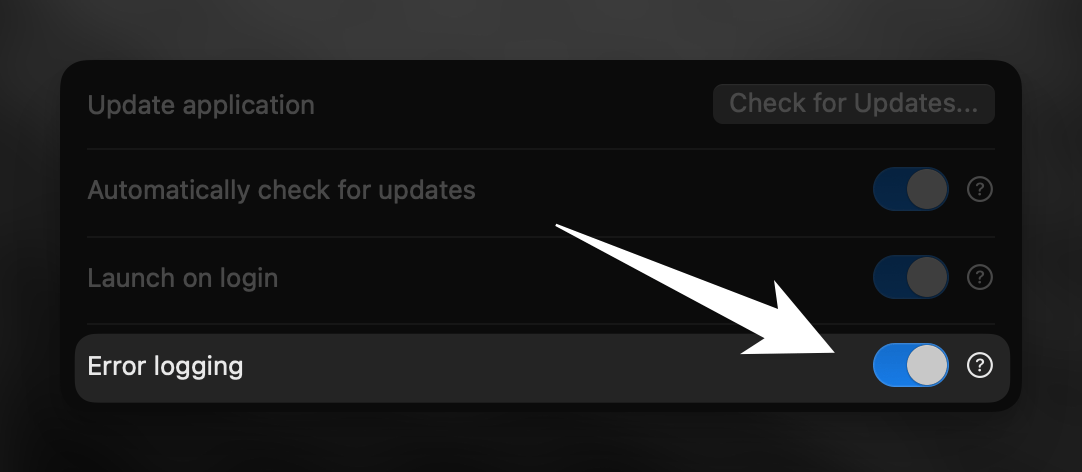
It is suggested you activate error logging in the Configuration tab. This helps diagnose issues through the application's built-in error tracking system.
 ***
## General Troubleshooting
If the recording window doesn't appear after pressing the keyboard shortcut, there might be a conflict in your shortcut settings. Check or modify your keyboard shortcuts configuration to fix this issue.
If the wave visualization in the interface isn't moving, this typically indicates an audio capture problem. Learn more about these settings.
If you're experiencing issues with your transcription results or AI processing, check this detailed guide to identify the origin of the issue and possible solutions.
***
## Common Issues and Solutions
If your language isn't being correctly detected or if automatic detection defaults to English, check this guide for solutions.
If you need to downgrade due to issues with the current version, here you can find links to previous Superwhisper versions.
If Superwhisper feels slow or unresponsive, check this guide for optimization tips to improve application speed and efficiency.
Real-time transcription is currently available only with Ultra Cloud Models. Learn how to enable and configure this feature.
If your custom modes aren't saving or disappear unexpectedly, it may be related to iCloud sync issues. This guide offers solutions.
If you're getting AI responses when you only want formatted transcription, check these prompting tips.
Having trouble activating your App Store purchase? This guide walks you through how to recover your license.
If context awareness isn't working correctly or you want to learn more about it, check this guide.
This custom mode-specific feature allows you to record audio as you listen. Learn more about it.
If you encounter reproducible bugs or issues, please submit them through our reporting system for faster resolution.
***
## General Troubleshooting
If the recording window doesn't appear after pressing the keyboard shortcut, there might be a conflict in your shortcut settings. Check or modify your keyboard shortcuts configuration to fix this issue.
If the wave visualization in the interface isn't moving, this typically indicates an audio capture problem. Learn more about these settings.
If you're experiencing issues with your transcription results or AI processing, check this detailed guide to identify the origin of the issue and possible solutions.
***
## Common Issues and Solutions
If your language isn't being correctly detected or if automatic detection defaults to English, check this guide for solutions.
If you need to downgrade due to issues with the current version, here you can find links to previous Superwhisper versions.
If Superwhisper feels slow or unresponsive, check this guide for optimization tips to improve application speed and efficiency.
Real-time transcription is currently available only with Ultra Cloud Models. Learn how to enable and configure this feature.
If your custom modes aren't saving or disappear unexpectedly, it may be related to iCloud sync issues. This guide offers solutions.
If you're getting AI responses when you only want formatted transcription, check these prompting tips.
Having trouble activating your App Store purchase? This guide walks you through how to recover your license.
If context awareness isn't working correctly or you want to learn more about it, check this guide.
This custom mode-specific feature allows you to record audio as you listen. Learn more about it.
If you encounter reproducible bugs or issues, please submit them through our reporting system for faster resolution.