> ## Documentation Index
> Fetch the complete documentation index at: https://superwhisper-docs-cloud-model-rate-limits.mintlify.site/llms.txt
> Use this file to discover all available pages before exploring further.
# Hallucinations & Unexpected Results
> Learn how to identify and resolve hallucinations and unexpected results.
## Overview
Hallucinations in AI refer to instances where the system generates content that wasn't provided by the user or produces unexpected results. In Superwhisper, these issues can occur in two distinct processing stages:
1. **Voice Transcription**: When your spoken words are converted to text
2. **AI Processing**: When the transcribed text is processed according to the selected mode
Check the [History tab](../get-started/interface-history) to identify exactly where hallucinations are occurring. You can analyze both the voice (transcription stage) and the AI-processed result to pinpoint the source of the issue.
***
## Transcription Hallucinations
Hallucinations during the voice transcription stage typically stem from two main causes:
Periods of silence can confuse the transcription model, causing it to generate words or sentences that weren't spoken.
The vocabulary prompt sent to the transcription model can sometimes lead to confusion, especially when too many custom words are added.
***
### Silence Removal
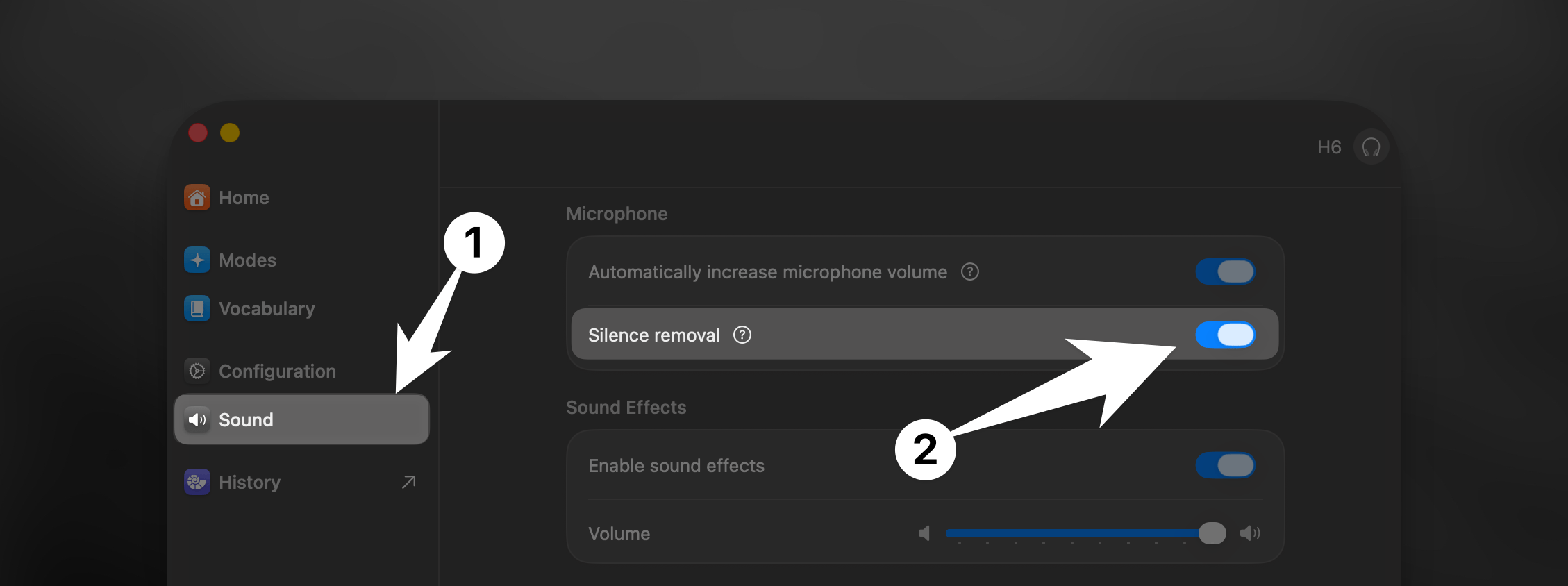 Navigate to the Sound tab in Superwhisper's Settings.
Toggle on the "Remove Silence" option. This will cut out silent periods from your audio before transcription, significantly reducing related hallucinations.
***
### Vocabulary
If you continue to experience hallucinations in the transcription stage after activating silence removal, check your vocabulary tab and make sure it only includes essential terms. The transcription model performs best with a focused vocabulary list.
Learn about how Vocabulary can improve your transcription accuracy.
If your dictation is being incorrectly transcribed in the wrong language, this may also be due to Vocabulary.
***
## LLM Hallucinations
Hallucinations during the AI processing stage can manifest as:
* AI answering questions you didn't ask
* Incorrect formatting of your dictated text
* Additional comments or content which was not part of your dictation
These issues typically arise from the following:
***
### Custom Mode Prompts
The built-in modes in Superwhisper are optimized for reliable results. When creating custom modes, proper prompting becomes essential.
If you're using custom modes, hallucinations may occur due to:
* Imprecise prompt instructions
* Lack of clear examples
* Conflicting directives in your prompt
Learn effective techniques for crafting custom mode prompts that produce reliable, consistent results. Discover how to structure instructions, provide examples, and avoid common pitfalls that lead to unexpected outputs.
***
### Model Capability Limitations
Not all AI models have the same capabilities. They vary in performance and reliability.
Cloud models generally provide the best performance and are less prone to hallucinations with complex requests.
Local models may have more limited capabilities and require more specific prompting to avoid hallucinations.
***
### Context-Related Issues
Superwhisper can use different types of context to enhance AI processing, but these can sometimes lead to hallucinations:
When enabled, Superwhisper captures text from your active input field. If there's too much text or irrelevant content, it may confuse the AI.
If you accidentally copy text during dictation with clipboard context enabled, this unrelated content may confuse the AI model.
**Best practices for context usage:**
* Only enable context features in modes where they're specifically needed
* Use application context selectively in text-heavy applications
* Be mindful of clipboard operations during dictation
Learn how context awareness features work in Superwhisper, when to use them, and how to avoid related issues.
Navigate to the Sound tab in Superwhisper's Settings.
Toggle on the "Remove Silence" option. This will cut out silent periods from your audio before transcription, significantly reducing related hallucinations.
***
### Vocabulary
If you continue to experience hallucinations in the transcription stage after activating silence removal, check your vocabulary tab and make sure it only includes essential terms. The transcription model performs best with a focused vocabulary list.
Learn about how Vocabulary can improve your transcription accuracy.
If your dictation is being incorrectly transcribed in the wrong language, this may also be due to Vocabulary.
***
## LLM Hallucinations
Hallucinations during the AI processing stage can manifest as:
* AI answering questions you didn't ask
* Incorrect formatting of your dictated text
* Additional comments or content which was not part of your dictation
These issues typically arise from the following:
***
### Custom Mode Prompts
The built-in modes in Superwhisper are optimized for reliable results. When creating custom modes, proper prompting becomes essential.
If you're using custom modes, hallucinations may occur due to:
* Imprecise prompt instructions
* Lack of clear examples
* Conflicting directives in your prompt
Learn effective techniques for crafting custom mode prompts that produce reliable, consistent results. Discover how to structure instructions, provide examples, and avoid common pitfalls that lead to unexpected outputs.
***
### Model Capability Limitations
Not all AI models have the same capabilities. They vary in performance and reliability.
Cloud models generally provide the best performance and are less prone to hallucinations with complex requests.
Local models may have more limited capabilities and require more specific prompting to avoid hallucinations.
***
### Context-Related Issues
Superwhisper can use different types of context to enhance AI processing, but these can sometimes lead to hallucinations:
When enabled, Superwhisper captures text from your active input field. If there's too much text or irrelevant content, it may confuse the AI.
If you accidentally copy text during dictation with clipboard context enabled, this unrelated content may confuse the AI model.
**Best practices for context usage:**
* Only enable context features in modes where they're specifically needed
* Use application context selectively in text-heavy applications
* Be mindful of clipboard operations during dictation
Learn how context awareness features work in Superwhisper, when to use them, and how to avoid related issues.